Universal Data Feed
Thanks for purchasing our product, we hope it will fulfil all your requirements and expectations.
Installation
This module does not affect critical parts of opencart, so it is not necessary to make backup before installing.
If you have any problem after installing the module, just disable the vqmod/ocmod modification and contact us.
VQMOD or OCMOD ?
- OCMOD is the modification system integrated since opencart 2.0, use this version if you have opencart 2.0+ and don't have VQMOD installed.
- VQMOD is the modification system used on opencart 1.5 but that is still working on 2.x and 3.x, VQMOD is generally better on module compatibility, so if you have it better use VQMOD version of the module.
VQMOD is not integrated in opencart by default, you will have to install it (using Easy VQMOD Installer for example).
Installation procedure - OCMOD (opencart 2.x and 3.x)
Because of limit in length of ocmod modification when stored in sql, the ocmod modification file is put in /system directory, so you won't find it in modifications list but you will have to refresh modifications anyway, if you want to disable it you can rename the modification file to .xml_ (and refresh again)
Install via Extension installer
On OC 3.x the extension installer is very limitating and does not allow to write in some folders, if you have a warning uppon installation you can install this fix to be able to install correctly or you can also use the FTP installation procedure.
- Download the module package on your desktop (file finishing by .ocmod.zip)
- Go to Extensions > Extension installer and select the module package
- Go to Extensions > Modifications and push the refresh button (the module does not appear in the list)
- Go to Extensions > Feeds, and click on install button
Install via FTP
- Use this if for some reason you can't install via extension installer (timeout, max upload file size)
- Download the module package on your desktop (file finishing by ocmod.zip)
- Copy content of the "upload" folder into the opencart root folder of your FTP
- Go to Extensions > Modifications and push the refresh button (the module does not appear in the list)
- Go to Extensions > Feeds, and click on install button
Installation procedure - VQMOD (opencart 1.5 to 3.x)
Install via Extension installer (not available in 1.5)
- If vqmod is not yet installed, install this Easy VQMOD Installer package
- Download the module package on your desktop (file finishing by .vqmod.zip)
- Go to Extensions > Extension installer and select the module package
- Go to Extensions > Feeds, and click on install button
Install via FTP
- If vqmod is not yet installed, install this Easy VQMOD Installer package
- Download the module package on your desktop (file finishing by .vqmod.zip)
- Copy content of the "upload" folder into the opencart root folder of your FTP
- Go to Extensions > Feeds, and click on install button
Update procedure
Update is very easy, it is not necessary to uninstall the module before proceed.
Update OCMOD version via Extension installer- Download the module package on your desktop (file finishing by ocmod.zip)
- Go to Extensions > Extension installer and select the module package
- In Extensions > Modifications, push the refresh button
- Download the module package on your desktop (file finishing by ocmod.zip)
- Copy content of the "upload" folder into the opencart root folder of your FTP
- Go to Extensions > Modifications, activate the corresponding module modification, and push the refresh button
- Download the module package on your desktop (file finishing by vqmod.zip) and rename it to .ocmod.zip (extension installer allows only files named like this)
- Go to Extensions > Extension installer and select the module package (rename vqmod.zip to ocmod.zip)
- Copy content of "upload" folder into the opencart root folder
How to switch between vqmod and ocmod versions?
- Delete the file /vqmod/xml/[module_name].xml (or rename to .xml_)
- Download ocmod package and upload the file /system/[module_name].ocmod.xml to your system folder
- In Extensions > Modifications, push the refresh button
- To switch from ocmod to vqmod just do the reverse operation
You have a customized admin folder (VQMOD only)?
- Open the file /vqmod/pathReplaces.php in a text editor (like notepad++)
- add a line: $replaces[] = array('~^admin\b~', 'my_custom_admin');
Usage
Universal Data Feed allows you to create any kind of product feed, the module is made to handle unlimited number of products, it has features to finely handle cached file, manual generation or cron generation.
Feed Overview
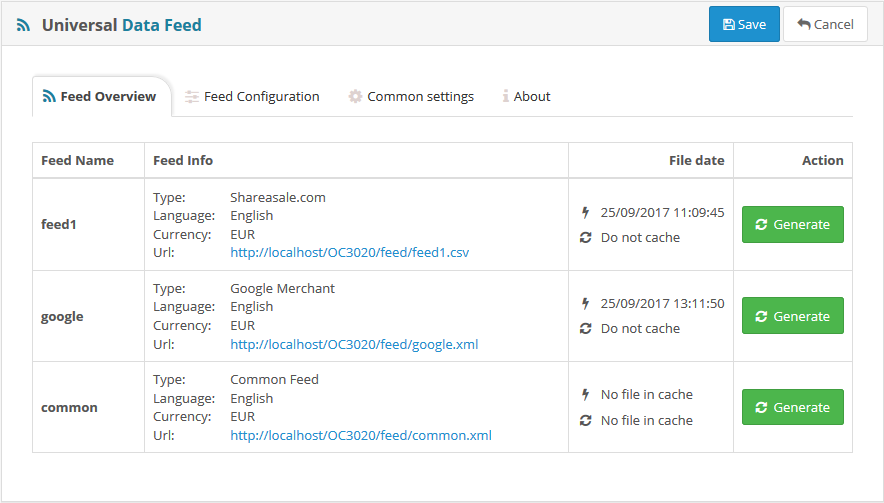
This screen lists all your defined feeds and related informations, from there you can generate any feed.
| Last cached file date. | |
| Next automatic generation date. | |
| Manually generate the feed. This function supports unlimited products (automatic generation does not). |
Feed configuration
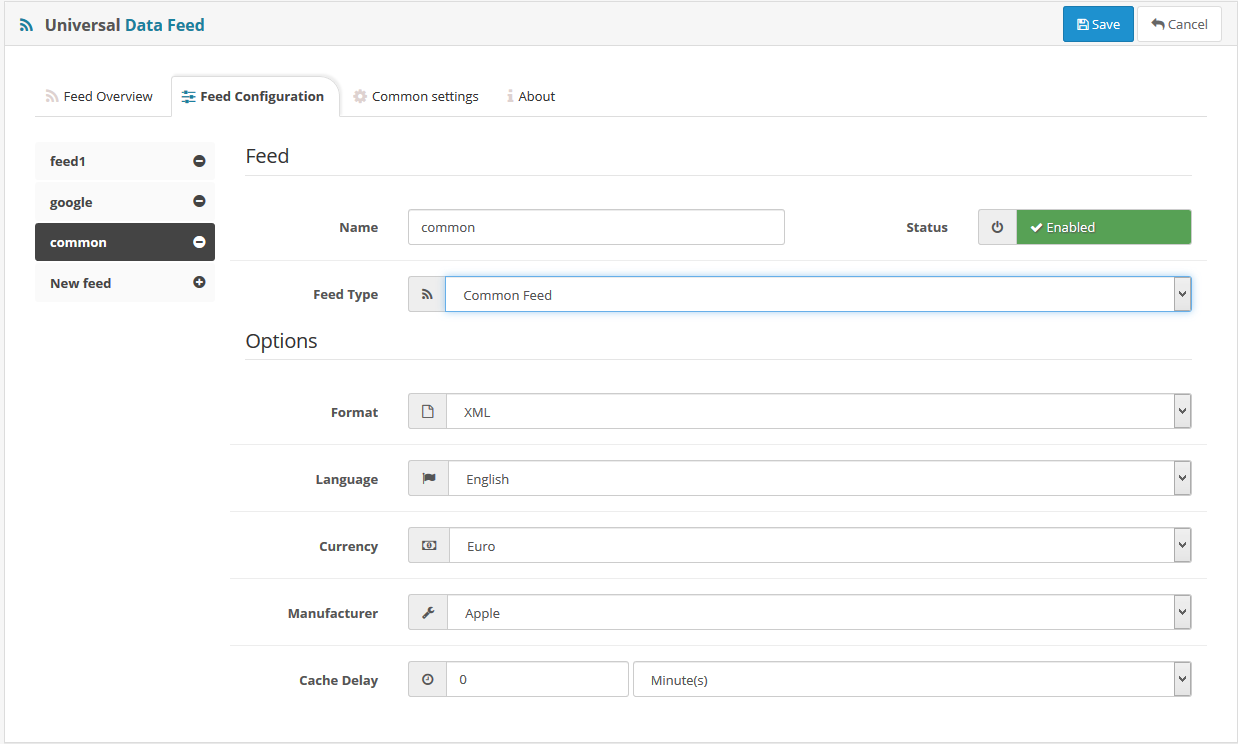
Define and edit your feeds in this screen.
Create a feed
- Click on (+) button next "New feed"
- Choose a name for your feed
- Choose the feed type (if a feed you would like is not available contact us to integrate it)
- Select the feed specific options and save settings
- Now the feed is appearing on the Feed overview screen so you can see its link and manually generate it
Caching
The module includes a cache feature, if the feed is big a generation on-the-fly may be very long, and in some case may time out because of server limitations, so the cache is solving this issue.
The cache is managed by the option
Do not cache: if you want the module to not cache the file put 0 in the cache delay, so each time the file will be reached by url it will be automatically generated on-the-fly, but consider that this may not work for big feeds.
Use auto generate and cache: if you want your feed to be generated on-the-fly, but only one time each (x) delay, for example one time per week, then just set 7 days in cache delay, the first time the file will be generated, and if the url is called again within 7 days after first generate then the cached file will be displayed, this is saving your server ressources. Then once passed the 7 days and the url is called again the file will be generated on-the-fly again.
Do not generate on-the-fly: if you have big feeds you may do not want to have an on-the-fly generation at all because it will simply fail, in this case the best is to set a very long delay in the cache delay (set 100 years for example), then you will have to generate the file manually using the generate button in feed overview, or use a cron job to automatically generate the feed each (x) delay.
Common settings
In this screen you can handle some extra settings.
Friendly URL: Get the feeds displayed with a nice url like http://example.com/feeds/my-feed.xml
Category bindings: Some feed server have their specific categories (google merchant, shareasale, etc), in this case you can configure the category correspondancies in dedicated sections.
Cron jobs: Check there how to set up the cron jobs to automatically generate feeds cache file at specific time.
Support
For any problem or feature request, feel free to contact us by creating a ticket:
- Use the Support Center: support.geekodev.com
- Or create a ticket directly by sending a mail to: support@geekodev.com
You may also be interested in these best selling modules :